Exploratory testing is a software testing approach in which the tester learns about the application, designs tests and runs them at the same time, using what each test reveals to decide what to try next. Instead of following a predefined script, the tester works from a short mission (a charter), inside a time-boxed session, and records what they did and found. It is how teams find the bugs nobody thought to write a test case for: the odd sequences, the confusing workflows and the business scenarios that “shouldn’t be possible.”
Key facts
- What it is: simultaneous learning, test design and test execution, guided by the tester's skill rather than a script.
- Type of testing: experience-based and usually black-box (the tester works through the UI or API, not the code).
- How it's structured: session-based test management: a charter, a time-boxed session and a debrief.
- Typical session: 60 to 120 minutes, uninterrupted; 90 minutes is a common default.
- Best for: new features, changing or incomplete requirements, usability, and complex multi-step workflows.
- Not a replacement for: scripted regression tests and automation. It complements them.
This guide covers what it is (and isn’t), why it’s worth the time, how to run it in sessions, how to build a structured strategy around it, when automation fits, and a charter template and debrief checklist you can use today.
What is exploratory testing?
Elisabeth Hendrickson describes it well: exploratory testing is “a style of testing in which testers are simultaneously learning about the system while designing and executing tests, using feedback from the last test to inform the next.”
The term goes back to Cem Kaner in the 1980s, although testers had worked this way informally long before it had a name. Today it’s a core part of most testing strategies, particularly in agile teams where software testing effectiveness depends on fast feedback and continuous adaptation.
In practice, testers start with a broad objective such as “investigate the login functionality” and move through the software, adjusting their strategy as they learn. As the Ministry of Testing puts it, it’s an alternative to scripted testing, not an absence of method.
Consider a new e-commerce checkout. A scripted test verifies that clicking “Place Order” creates an order. An exploratory session might reveal that rapidly switching between payment methods corrupts session data, or that using the browser’s back button at a particular step creates a duplicate charge. Those are the edge cases that formal test cases miss because nobody anticipated them during test planning.
What exploratory testing is not
Two misunderstandings come up constantly.
It isn’t ad hoc testing. When someone says they found issues by “simply browsing about,” that’s not exploratory testing. Ad hoc testing is unplanned and usually unrecorded. Exploratory testing has a mission, a time box and notes, and the results can be reviewed, repeated and reported.
It isn’t a last-minute sanity pass. “Let’s do some exploratory testing before the release, just to make sure” misses the point. It’s a deliberate activity aimed at specific risks, and most valuable early, while there’s time to act on what it finds.
Exploratory vs. scripted vs. ad hoc testing
In scripted testing, you write a test case, execute it and compare the outcome with what was expected. The script is in control, and the emphasis is on prediction and decision-making. In exploratory testing, you explore the application, note faults, design the next test, execute it and repeat. The tester’s mind is in control, and the emphasis is on adaptability and learning.
| Scripted testing | Exploratory testing | Ad hoc testing | |
|---|---|---|---|
| Test design | Before execution, written down | During execution, informed by each result | None |
| What drives it | The test case | The tester’s skill, guided by a charter | Whim or curiosity |
| Documentation | Test cases and results | Charter, session notes, bugs, debrief | Usually none |
| Repeatable | Yes, exactly | The charter is; the path varies | No |
| Finds | Regressions, deviations from spec | Unknown risks, edge cases, usability and business bugs | Whatever turns up |
| Best when | Behavior is known and stable | Behavior is new, unclear or complex | Rarely the right choice on its own |
Why exploratory testing matters
There’s a psychological foundation to this. Joseph Luft and Harrington Ingham created the Johari window to help people understand their relationships with themselves and others. Its four quadrants are known knowns, blind spots, hidden areas and unknown unknowns, and the idea applies neatly to software:
- Knowns are the requirements that automated and manual tests already check.
- Unknown knowns are assumptions and expectations about the program, such as its performance, which you can make known with, for example, performance testing.
- Blind spots can be covered by asking questions.
Those give a team its confidence in quality. But the risks that do reputational damage lurk in the unknown unknowns, and scripted tests can’t target what nobody has thought of. Exploration is how you reach that quadrant.
Benefits of exploratory testing
- It uncovers hidden defects and edge cases. Testers follow their intuition into rarely travelled paths. Exploration is especially good at complex defects that need a specific sequence of steps, inputs or timing to trigger, which a test case checking one thing at a time won’t reach.
- It adapts to changing requirements. When requirements change weekly, keeping scripts current is impractical. Exploratory testers shift focus as priorities change, and the approach works even when requirement documents are missing or incomplete.
- It shortens the feedback loop. Testers can start on a new build with little preparation and surface critical issues within hours, while the code is still fresh for developers.
- It evaluates the user experience, not just the function. Scripts verify that a feature works; exploratory testers notice confusing workflows, misleading labels and frustrating interactions.
- It finds business bugs. Sometimes a tester can complete a business scenario that should be impossible, or can’t complete one that should work. These “business bugs” come from combinations nobody specified, and sessions by people who know the domain are one of the few reliable ways to find them.
- It improves the rest of your testing. What testers learn shows which scenarios deserve a scripted or automated test, and builds product knowledge across the team.
Limitations to plan for
Exploratory testing has real drawbacks, and a strategy should address each one:
- Documentation gaps make defects hard to reproduce and coverage hard to track. Session notes fix this.
- Dependence on the tester: results vary with skill and domain knowledge. Training, pairing and shared heuristics reduce the variation.
- The “explorer’s dilemma”: testers get absorbed and lose sight of the goal. Charters and time boxes keep them on track.
- The hammer and nail problem: designing tests on the fly, testers can fall into running the same one or two kinds of test, or find things stakeholders don’t care about. Focused charters, approached from several angles, prevent this.
- Measuring effectiveness: counting test cases doesn’t work. Measure areas covered, time per area, defects found and their severity, and escaped defects.
- Over-reliance: on its own it leaves gaps. It belongs alongside scripted and automated testing, not instead of them.
How exploratory testing works: session-based test management
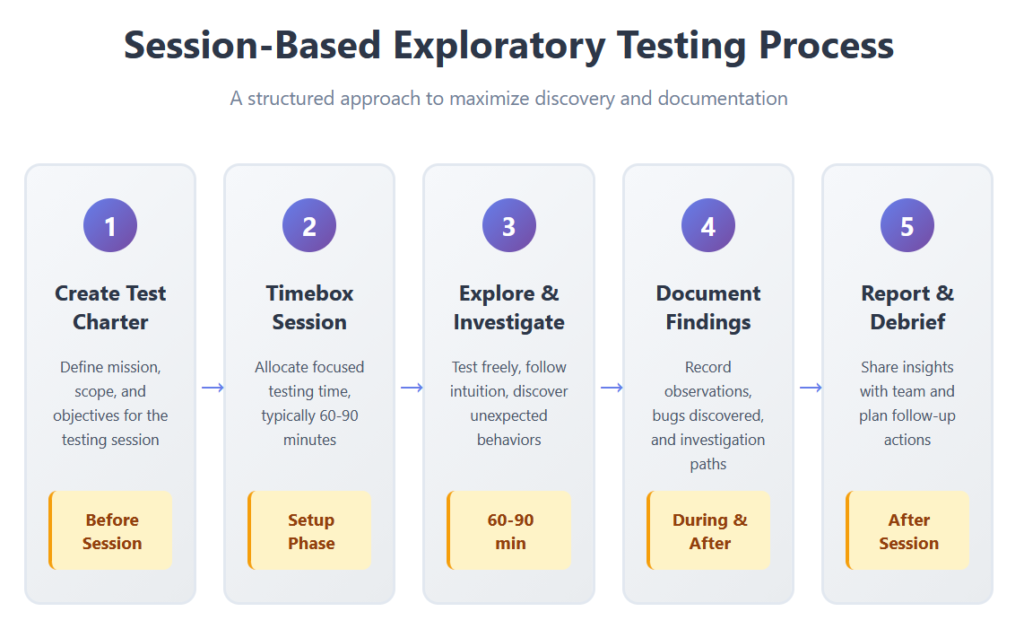
The most widely used way to give exploratory testing structure is session-based test management (SBTM), developed by Jonathan and James Bach. It has three parts.
Charters
A charter is a short mission statement that guides a session. It is a direction to explore, not a script to follow. Good charters say what to explore, with what resources, to discover what kind of information, for example “explore payment processing with various card types to discover validation and error-handling problems” or “investigate mobile responsiveness across the authentication flows.” A well-written charter defines what to test without prescribing how, which leaves testers room to use their judgment about which paths deserve a closer look.
Time-boxed sessions
A session is an uninterrupted block of testing against one charter, typically 60 to 90 minutes. If something critical comes up, extend it by 30 to 45 minutes; if the charter turns out to be smaller than expected, end early. Fixed endpoints prevent fatigue, stop endless investigation with diminishing returns and create natural points to write things up. They also make effort measurable, so leads can plan capacity in sessions.
Debriefs
After the session, the tester (or pair) reviews the results with a lead or a teammate: what was covered, what was found, what got in the way and what still needs testing. The findings are compared with the original charter, and new charters are written for anything that deserves more attention.
Tours and heuristics: where to look
Testers who are new to exploration often ask “but what do I actually do?” A few techniques give them a starting point:
- Follow a persona. Put yourself in the position of one of your most frequent users and follow them through the software, looking for problems specific to that user.
- Break the expected path. Where the steps say click twice, click three times. Go back a few steps or jump ahead. Use the back button and browser shortcuts. Change values mid-flow. What happens when you leave the path?
- Build a mental map. Outline every scenario you can think of within the limits you’ve been given, then work down each route.
- Try to break it. Use what you know about similar products and their typical failures. Don’t just confirm that something works; look for the ways it doesn’t.
- Vary the data. Zero, one and many; too big, too small and just right; boundaries, empty values, special characters and duplicates.
- Use quality criteria as lenses. Capability (does it do what it should?), reliability (does it hold up under failure?), charisma (is it appealing and pleasant to use?), scalability (does it scale up and down?) and compatibility (does it work with third-party components and configurations?).
How to build a structured exploratory testing strategy
The freedom of exploratory testing comes with a risk: random, ad hoc results with no consistency between testers, test managers and projects. Testers shouldn’t be restricted, but a disciplined approach turns exploration into specific, useful bug reports and feedback. Here’s how to set one up.
1. Set expectations
Make clear that exploratory testing is a creative, experience-based technique in which design, execution and learning happen at once, not testers clicking around at random. Testers are often deliberately split into teams that look at the application from different perspectives: feature sets, actions and consequences, account types and so on.
For example, when testing an app for managing a family calendar of chores, events, appointments and to-do items, a tester needs to know which features (such as intricate mobile gestures) are prone to defects, and to spot extra test ideas, such as adding two collaborators to a to-do list instead of one to check the alerts. When it’s hard to write test cases for individual features or to judge the overall user experience, structured exploratory testing is an excellent complement to functional testing.
2. Plan from risk and history
Start with bug classification: group the most common problems found in previous projects and look for their root causes. Combine that with what’s new or changed in this release, and turn the riskiest areas into test ideas for the next round of sessions.
3. Write charters that cover the application
A team charter describes the plan: where to start, what to test, how to approach it, who plays which role and anything else to consider. A set of charters, one per risk area, spreads testing across the whole application instead of everyone exploring the same screen. Mark what’s in scope and out of scope so testers spend their time on what matters to the customer.
4. Learn, design, execute
Each session follows the same loop. Learn the application from top to bottom: its purpose, its users, how it might break and what the developers might have missed. Design the approaches you’ll use. Execute, covering the common scenarios (boundary values, validations and so on) as well as the unusual ones, and report what you find.
5. Time-box and pair
Two testers working together for 90 minutes, uninterrupted, is a common pattern. Pairing brings two perspectives: one person drives while the other observes and takes notes, and they swap partway through. It’s also one of the best ways for junior testers to learn exploration from experienced colleagues, and fresh eyes often spot patterns that veterans have stopped seeing.

6. Review, report and debrief
Document results in session and bug reports, then debrief against the original charter and recommend further testing where it’s needed. Keep every report where the whole team can search it, so nobody repeats a session that’s already been done.
7. Track coverage
Coverage for exploratory testing means areas investigated, not test cases executed: which features and risks got sessions, how much time each received, and how many defects (and how severe) each produced.
Exploratory testing best practices
- Always start with a charter. It’s the difference between exploration and wandering.
- Time-box every session and protect it from interruptions.
- Take notes as you go: actions, data, environment, questions and ideas. Screenshots and screen recordings make bugs reproducible.
- Log bugs immediately with steps to reproduce, while the context is fresh.
- Debrief after every session and turn open questions into new charters.
- Pair testers, especially on complex features and when onboarding.
- Involve people with domain knowledge. Product owners, support staff and business experts find the business bugs others miss.
- Start early. Explore features as soon as code is available, as part of shift-left testing, when findings are cheapest to fix.
- Combine it with scripted and automated testing. Use scripted tests for known, stable behavior and exploration for the unknown.
- Turn important findings into regression tests so fixed bugs stay fixed.
- Invest in training. Teach heuristics and tours, and give testers time to practice.
- Keep sessions and evidence in one place so coverage, findings and follow-ups are visible to the whole team.
When to use exploratory testing (and when not to)
Exploratory testing earns its keep early in development, while requirements are still fluid; in agile and DevOps teams, where sprints leave little time to update scripts (it fits well with behavior-driven development); on new features in existing systems, where the risk is in unexpected interactions with old code; in user acceptance testing; and alongside automated suites, to reach what automation doesn’t.
| Scenario | Best approach | Why |
|---|---|---|
| Regression checks on stable features | Scripted / automated | Repetitive checks benefit from automation’s efficiency |
| Investigating new functionality | Exploratory | Unknown behavior needs adaptive investigation |
| Verifying compliance requirements | Scripted | Regulators need documented, repeatable tests |
| Usability and UX evaluation | Exploratory | Human judgment assesses the user experience |
| Performance baseline monitoring | Automated | Consistent metrics need standardized measurement |
| Complex user workflows | Exploratory | Multi-step scenarios reveal integration issues |
| Security vulnerability discovery | Combined | Automated scans plus exploratory probing |
Should exploratory testing be automated?
The honest answer: the exploration itself, no; what it discovers, often yes.
Exploratory tests are designed and run in the same moment and are different every time, so automating them as such would defeat their purpose. Exploration is about discovery and learning; automation is about defined test cases and expected outcomes. They do different jobs, and software comes out with far fewer flaws when both are used together.
Exploratory tests are often high-level “business” tests: someone who knows the domain carries out a complete business scenario, which may span several departments, systems and processes. Automating these is hard, because combining many features produces a huge number of possible scenarios, and each platform needs the same conditions reproduced.
When an exploratory session finds a business bug, there are two possibilities:
- The software doesn’t match the specification. There’s a defect that appears in a scenario nobody’s test plan, manual or automated, had covered.
- The software matches the specification, but the scenario was never specified. It’s impossible to describe every functional possibility of a product, and you’ve reached a grey area. Testers who understand the business can describe the intended behavior, which differs from what they just experienced. This is a strong argument for getting testers involved early, working directly with functional architects and product owners.
In both cases, fix the problem and write a new test case that captures the intended behavior. Where it’s practical, automate that scenario and add it to your regression suite, so the bug can’t return. Customers rightly hate reporting a bug in version N, seeing it fixed in N+1 and finding it back in N+2. Grouping these tests into a cycle that runs on every release keeps them working. If the scenario’s combinations make full automation impractical, keep it as a well-documented manual test case with preconditions, steps and expected results, linked to the original bug. For automation frameworks, see Selenium vs. Cucumber and our guide to regression testing challenges and best practices.
AI agents are starting to change this picture by exploring applications autonomously. That’s a different discipline with its own trade-offs, covered in our guide to agentic exploratory testing.
Exploratory testing tools
Exploratory testing is about human judgment, not tooling, but the right tools make sessions easier to run and their results easier to use. Choose them up front and make them available to every tester.
- Note-taking and capture. The Exploratory Testing Chrome extension records bugs, ideas, notes and questions and tracks URLs and screenshots automatically. RapidReporter is a standalone note-taker for uninterrupted sessions that exports to CSV.
- Screenshots and recordings. Nimbus captures page regions and scrolling screenshots; Loom records video for bug reproduction. Recordings let developers see exactly what triggered a problem.
- Collaboration. Video calls and screen sharing let distributed teams pair-test remotely and talk to developers while the issue is on screen.
- Test management. Azure Test Plans includes an exploratory testing tool for teams on Azure DevOps. TestQuality covers the test-management side of exploration: its Explorations let you create a session with a mission, log observations in real time, mark results as pass, fail or other, attach screenshots and files, and raise defects in GitHub or Jira directly from the session log, next to your manual and automated test results.
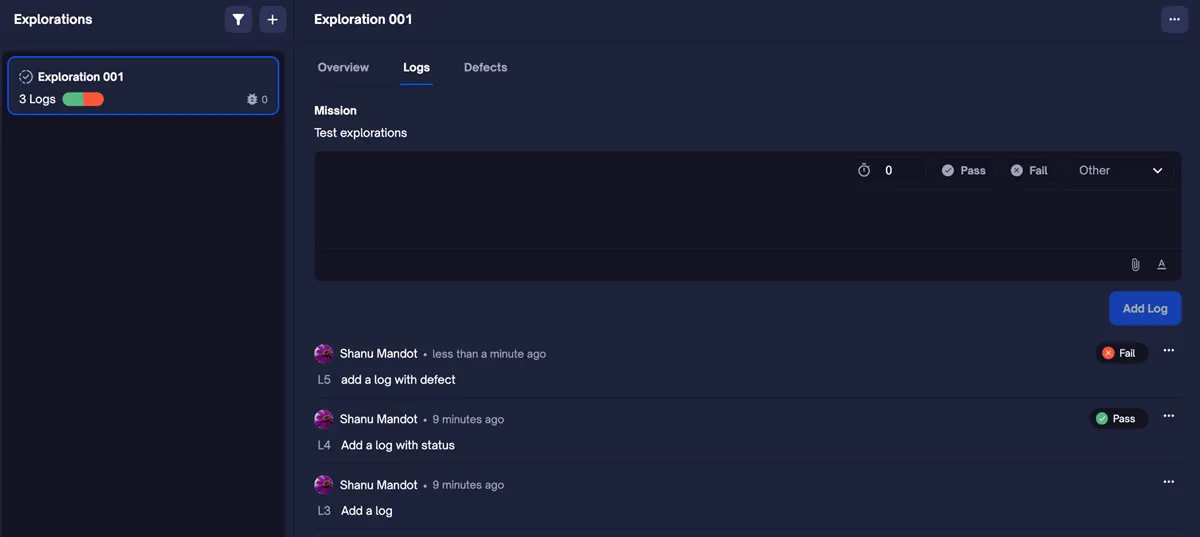
One TestQuality customer runs exploratory sessions often: when they find a bug, they create a test case in TestQuality and log the defect in GitHub at the same time, thanks to the live two-way integration. Tests created over several days all go into a single run set aside for ad hoc and exploratory tests. For the full picture of planning, tracking and reporting exploratory work across a team, read Exploratory Test Management: The Complete Guide for Modern QA Teams.
Exploratory testing charter template and debrief checklist
Copy these into your test management tool or team wiki.
Charter template
| Field | What to write | Example |
|---|---|---|
| Charter | Explore target with resources to discover information | Explore checkout with saved and new cards to discover payment and session-handling problems |
| Areas in scope | Features, flows or screens | Cart, payment step, order confirmation |
| Out of scope | What to skip | Shipping-rate calculation |
| Risks to probe | What you’re worried about | Switching payment methods, back button, double submit, expired cards |
| Setup | Build, environment, devices, accounts, test data | Staging build 4.12, Chrome and Safari iOS, two test accounts |
| Testers and roles | Who drives, who observes | Ana (driver), Raj (notes) |
| Time box | Planned duration | 90 minutes |
Session debrief checklist
- What was covered, and what wasn’t, compared with the charter?
- Bugs logged, with steps to reproduce, environment and evidence attached
- Issues and questions that aren’t bugs yet (unclear behavior, possible requirement gaps)
- Time split: testing vs. setup vs. investigating bugs
- Anything that blocked or slowed testing (environment, data, access)
- Findings that should become scripted or automated regression tests
- New charters for follow-up sessions
- Overall impression: how risky does this area feel now?
FAQ
Is exploratory testing black-box testing?
Usually, yes. Most exploratory testing is done through the user interface or API without looking at the code, which makes it a black-box technique. It isn’t strictly limited to that: a tester who knows the architecture can use that knowledge to aim sessions (sometimes called grey-box exploration), but the testing itself is still driven by observing behavior.
What’s the difference between exploratory testing and ad hoc testing?
Neither uses predefined scripts, but exploratory testing is structured: it has a charter, a time box, notes and a debrief, so its results can be reviewed, reported and repeated. Ad hoc testing is unplanned and usually unrecorded. Exploratory testing balances freedom with accountability; ad hoc testing has only the freedom.
Who does exploratory testing?
Mostly QA engineers and testers, but it works best as a team activity. Developers explore their own features before handing them over, product owners and business experts explore business scenarios, and support staff bring real customer behavior. Junior testers can take part effectively, especially when paired with experienced colleagues; senior testers often take the first sessions on complex features.
How long should an exploratory testing session be?
Typically 60 to 90 minutes, uninterrupted, against a single charter, extended by 30 to 45 minutes if something critical comes up. Much shorter sessions rarely get deep enough; much longer ones lead to fatigue.
Can exploratory testing be automated?
Not the exploration itself: its value comes from a person deciding what to try next based on what they just saw. What you should automate is what exploration discovers. Once a session finds an important bug, turn the scenario into a regression test so it doesn’t come back. Tools can capture notes and recordings, and AI agents can now do some autonomous exploration, but they complement human testers rather than replace them.
How does exploratory testing fit into agile?
Very naturally. Sprints leave little time to script every new story, so teams explore each story as soon as it’s ready, with charters linked to its acceptance criteria, and feed findings back within the sprint. Automation covers regression; exploration covers what’s new and risky. In regulated industries, charters and session reports provide the audit trail of what was tested, by whom and with what result.
Conclusion
Exploratory testing is how teams find the problems no one predicted. It isn’t random clicking: it works best with clear charters, time-boxed sessions, good notes and honest debriefs, combined with scripted and automated testing for everything you already know.
TestQuality gives you a place to run that structure: plan explorations, log sessions and evidence, raise bugs in GitHub or Jira and turn findings into test cases, alongside your manual and automated results. Start your free trial and bring your exploratory sessions into the same workflow as the rest of your testing.